- • What Is ITC Reconciliation and the IMS Workflow?
- • The Paradigm Shift: GSTR-2A vs. GSTR-2B
- • The 4 Mismatch Scenarios & How to Handle Them
- • The Automated Penalty Trap: Rule 88D & Form DRC-01C
- • Monthly 5-Step ITC Reconciliation SOP for Businesses
Expert Revision Notice — Last Verified: 1 September 2026
Key verification sources: 56th GST Council recommendations, CBIC Tax Information Portal, GSTN advisories (IMS implementation, DRC-01C thresholds).
In the early years of GST, claiming Input Tax Credit (ITC) was largely an honor-based system where businesses self-declared their purchase totals in Form GSTR-3B based on their internal accounting books.
Today, that era is completely over.
Under Section 16(2)(aa) of the CGST Act, a registered business can legally claim Input Tax Credit ONLY if that specific tax invoice has been uploaded by the supplier, processed through the Invoice Management System (IMS), and appears in the buyer’s auto-drafted Form GSTR-2B.
If you claim credit for an invoice that is in your accounting software but missing from your GSTR-2B (or rejected in IMS), the GST portal’s automated algorithms will flag the discrepancy and issue a demand notice under Rule 88D (Form DRC-01C), demanding immediate tax reversal plus 18% interest.
Performing a rigorous Monthly ITC Reconciliation between your internal Purchase Register and Form GSTR-2B has become the single most vital compliance routine for protecting your company’s cash flow.
This guide explains how the IMS workflow operates, contrasts it with historical GSTR-2A processes, outlines mismatch scenarios, explains how to handle non-compliant vendors, and details how to respond to DRC-01C notices.
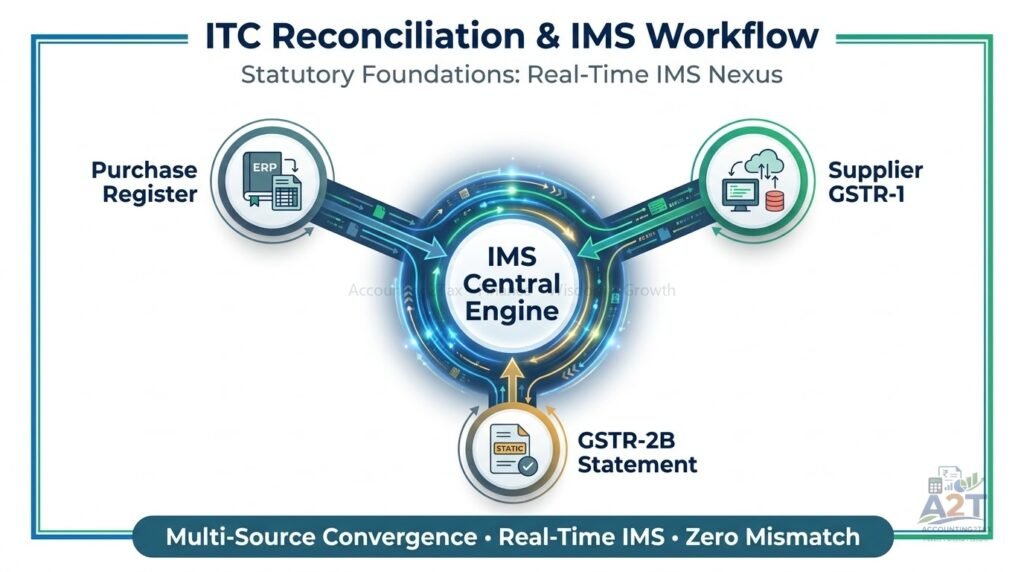
What Is ITC Reconciliation and the IMS Workflow?
ITC Reconciliation is the process of matching every purchase invoice recorded in your accounting software against the tax invoices uploaded by your suppliers to the GST Network (GSTN).
Since October 2024, this process runs through the Invoice Management System (IMS) before crystallizing into Form GSTR-2B.
The Modern IMS Workflow
Books → IMS Accept/Reject/Pending → GSTR-2B → GSTR-3B
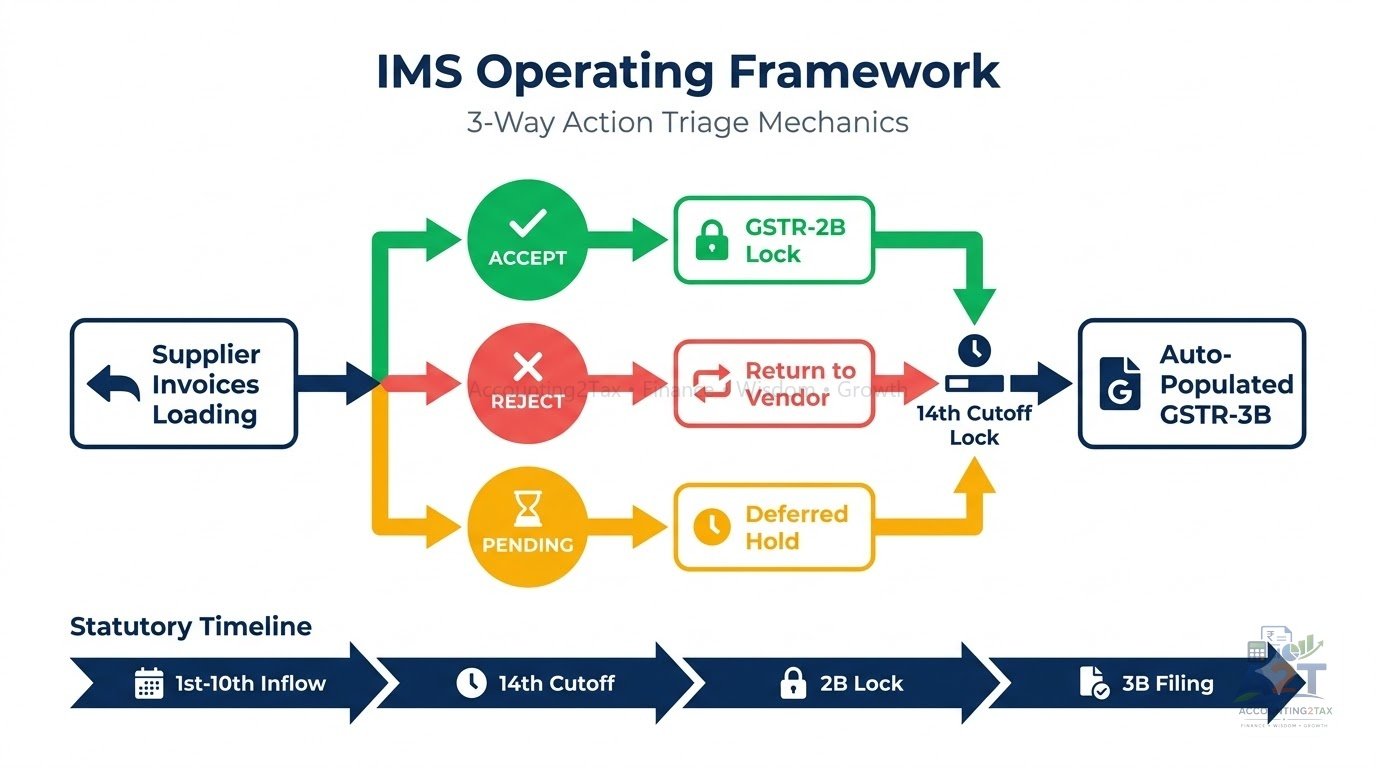
Invoices uploaded by your suppliers populate your IMS dashboard. Before your GSTR-2B is generated on the 14th of the month, you must take action:
- Accept: You approve the invoice. The ITC will flow into your GSTR-2B as eligible credit.
- Reject: You reject the invoice (e.g., incorrect value, not your purchase). The ITC will NOT flow to GSTR-2B.
- Pending: You keep the invoice on hold to claim in a future month (e.g., goods not yet received). The ITC remains parked and does not flow to the current GSTR-2B.
- No Action: Invoices left untouched are deemed accepted and flow to GSTR-2B.
 [ Purchase Register (Your Books) ]       [ IMS Dashboard (GST Portal) ]
 • Every vendor bill entered by you       • Supplier uploads via GSTR-1/IFF
                 │                                       │
                 └───────────────────┬───────────────────┘
                                     ▼
                        [ MONTHLY RECONCILIATION ]
                                     │
        ┌────────────────────────────┼────────────────────────────┐
        ▼                            ▼                            ▼
  [ EXACT MATCH ]            [ WRONG INVOICE ]            [ GOODS IN TRANSIT ]
   Accept in IMS              Reject in IMS                Mark Pending in IMS
  Claim in GSTR-3B           Blocked from GSTR-2B         Claim in future GSTR-2B
The Paradigm Shift: GSTR-2A vs. GSTR-2B
Many accountants still confuse GSTR-2A with GSTR-2B. Understanding the difference is crucial:
| Feature | Form GSTR-2A | Form GSTR-2B |
|---|---|---|
| Nature of Document | Dynamic statement (changes constantly) | Static & Constant statement (never changes) |
| Generation Date | Updates in real-time whenever a supplier files | Generated once a month on the 14th, based on IMS actions |
| Legal Status for ITC Claim | Informational reference only (Historical) | Statutory Benchmark under Section 16(2)(aa) |
| Cut-Off Date | No cut-off; past months update retrospectively | Strictly includes invoices processed by cut-off date |
| Actionability | Difficult to freeze for audits | Clear breakdown of: (A) Eligible ITC & (B) Ineligible/Blocked ITC |
The Rule: Always use GSTR-2B (not GSTR-2A) to determine your eligible Input Tax Credit when preparing your monthly GSTR-3B return.
The 4 Mismatch Scenarios & How to Handle Them
During monthly reconciliation, every purchase invoice falls into one of four buckets:
Scenario 1: Exact Match in Both (Books = IMS Dashboard)
- Status: Invoice number, date, taxable value, and tax breakdown match perfectly.
- Action: Accept the invoice in IMS. It will flow to GSTR-2B. Claim 100% ITC in Table 4(A)(5) of Form GSTR-3B.
Scenario 2: Invoice in Books, MISSING in IMS (Vendor Non-Compliance)
- Why It Happens: The vendor forgot to file GSTR-1 by the 11th, entered an incorrect GSTIN, or accidentally marked the invoice as B2C instead of B2B.
- Action: DO NOT claim ITC in the current month’s GSTR-3B. Hold the credit in your internal “ITC Pending” ledger. Follow up with the vendor to ensure they file or amend the invoice. Once it reflects in a future IMS dashboard, Accept it and claim the credit.
Scenario 3: Invoice in IMS, MISSING in Books
- Why It Happens: The vendor uploaded an authentic invoice, but your accounting team has not received the physical bill or the goods/services.
- Action: Verify if the expense is genuine. If the goods are still in transit, mark the invoice as Pending in IMS. You can Accept it in the month the goods are actually received.
Scenario 4: Value or Tax Rate Discrepancy
- Why It Happens: Typographical error in invoice value or wrong tax slab selected by vendor (e.g., entered ₹5,000 tax instead of ₹50,000).
- Action: If the vendor uploaded a higher value erroneously, you can Reject it or Accept and only claim the correct amount. If the vendor uploaded a lower value, Accept it for the lower amount, claim that lower ITC, and request the vendor to file an amendment in Table 9A of their next GSTR-1 (or via the new GSTR-1A facility) to rectify the differential.
The Automated Penalty Trap: Rule 88D & Form DRC-01C
To enforce automated compliance, the GSTN deployed Rule 88D:
How Rule 88D Operates:
- Automated System Notice: If the ITC claimed in Table 4(A) of GSTR-3B exceeds the eligible ITC available in GSTR-2B by more than 20% AND more than ₹25 Lakhs, the system auto-generates Form DRC-01C (Part A).
- 7-Day Compliance Window: The taxpayer has 7 calendar days to either:
– Pay the excess ITC claimed along with 18% interest under Section 50 using Form DRC-03 (mapped via the new DRC-03A functionality); OR
– Provide a formal explanation in Part B of Form DRC-01C (e.g., typographical error in 3B, or legitimate re-claim of previously reversed ITC). - Severe Sanctions for Inaction: If you ignore Form DRC-01C, the portal blocks your GSTR-1 for the subsequent month, preventing you from issuing valid B2B invoices to your clients.
Monthly 5-Step ITC Reconciliation SOP for Businesses
To protect your business from tax notices, institute this monthly operational checklist:
- [ ] Step 1 (Daily/Weekly IMS Check): Review the IMS dashboard and cross-verify with purchase books. Mark invoices as Accept, Reject, or Pending.
- [ ] Step 2 (Download GSTR-2B on 14th): Log in to the GST portal on the 14th and download the finalized GSTR-2B JSON or Excel file.
- [ ] Step 3 (Run Final Match): Ensure the final GSTR-2B matches your accepted IMS actions and internal books.
- [ ] Step 4 (Segregate Blocked Credits): Identify and reverse Section 17(5) ineligible credits (motor cars, catering, gifts) in Table 4(B) of GSTR-3B.
- [ ] Step 5 (Dispatch Vendor Defaulter Mails): Send automated emails to suppliers whose invoices are missing from the portal before paying their outstanding vendor balances.
Frequently Asked Questions (FAQs)
Q1. What happens if I don’t take any action on the IMS dashboard by the 14th?
Answer: Invoices left without action are treated as “deemed accepted” and will flow into your GSTR-2B. You can still choose not to claim the ITC in GSTR-3B, but actively managing IMS prevents reconciliation clutter.
Q2. Can a supplier correct a mistake after filing GSTR-1 but before I file GSTR-3B?
Answer: Yes, the supplier can use the GSTR-1A amendment facility (introduced in 2024) to correct invoices before their GSTR-3B is filed, which helps resolve mismatches faster.
Q3. Does DRC-01C mean my ITC is automatically denied?
Answer: No. Rule 88D generates a mismatch communication. If the difference is due to a legitimate reason (like reclaiming ITC previously reversed under Rule 37), you can file an explanation in Part B of DRC-01C.
Q4. I rejected an invoice in IMS by mistake. What now?
Answer: Rejected invoices do not flow to GSTR-2B. If rejected mistakenly, you may have to coordinate with the vendor or wait for subsequent amendment processes, delaying your ITC claim.
Q5. What is the DRC-03A form?
Answer: DRC-03A is a newer functionality that allows taxpayers to map payments made via DRC-03 directly against specific demand orders (like a DRC-01C demand), ensuring the ledger properly reflects the settled liability.
Calculate Your Invoice GST Values
Verify purchase taxes, model tax credits, and evaluate vendor tax breakdowns using the Accounting2Tax Financial Tools.
Use the GST Calculator to check tax amounts before running monthly ITC reconciliation.
Related Financial Wisdom
- Input Tax Credit Explained: How GST Paid on Purchases Works — core ITC rules.
- GSTR-1 and GSTR-3B: Understanding Their Different Purposes — monthly filing cycle.
- GST Returns Explained: Understanding the GST Filing System — return landscape.
- Common Input Tax Credit Mistakes and Ineligible Blocked Credits — blocked credits guide.
- GST Notices Explained: Common Reasons and How to Respond (Article 107 — coming soon).
Key Takeaways
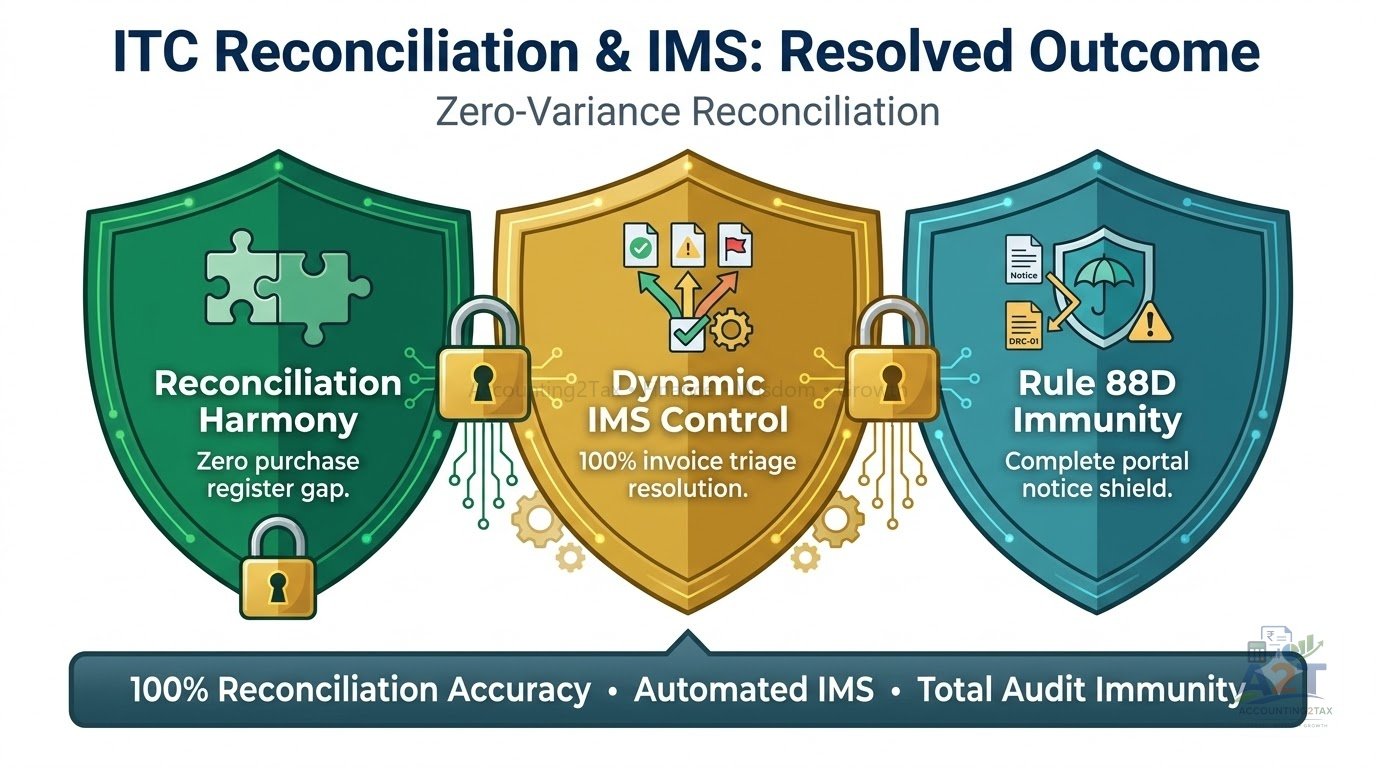
- Under Section 16(2)(aa), Input Tax Credit can ONLY be claimed if it appears in your auto-drafted Form GSTR-2B.
- The Invoice Management System (IMS) requires you to Accept, Reject, or mark Pending supplier invoices before GSTR-2B generation.
- GSTR-2B is static and freezes on the 14th of every month, unlike the dynamic historical GSTR-2A.
- If a vendor fails to file GSTR-1, hold the ITC in your books and follow up with the vendor; do not claim it prematurely.
- Excess ITC claims over GSTR-2B (by >20% and >₹25 Lakhs) trigger automated Form DRC-01C notices under Rule 88D with a strict 7-day response window.
📚 Sources & Official Regulatory References
| Section / Rule | Source | Authority | Checked On | Effective Date |
|---|---|---|---|---|
| Section 16(2)(aa) (Mandatory GSTR-2B Matching for ITC Claims) | Central Goods and Services Tax Act, 2017 | Tier 1 | 2026-09-01 | Current |
| Invoice Management System (IMS) Workflow | GSTN Advisories & Circulars | Tier 1 | 2026-09-01 | Oct 2024 |
| Rule 88D & Form DRC-01C (Mismatches > 20% & ₹25L) | CBIC Notifications / CGST Rules | Tier 1 | 2026-09-01 | Current |
| Form DRC-03A Payment Mapping | GSTN Advisories | Tier 1 | 2026-09-01 | Current |
📚 Explore More in ITC (GST)
Taxonomy Series
Discover related guides, taxonomy series, and interactive financial calculators:
This publication is strictly for educational, research, and informational purposes and does not constitute formal financial, investment, tax, or legal advice.
- Data Accuracy & Inadvertent Errors: While every reasonable effort is made to maintain accuracy, all information, interest rates, tax thresholds, formulas, and statutory data are provided on an “as-is” basis. Accounting2Tax makes no express or implied warranties regarding absolute completeness, timeliness, or typographical and computational infallibility. Statutory authorities (Ministry of Finance, RBI, CBDT, CBIC, SEBI, PFRDA) update guidelines periodically. Readers must independently verify current rates and rules on official government portals before executing financial transactions.
- Illustrations, Simulations & Limitations of Liability: Mathematical models, compounding simulations, case studies, and hypothetical return projections are conceptual tools designed solely to demonstrate financial principles. They do not constitute guaranteed returns, profit forecasts, or capital safety commitments. Accounting2Tax and its authors disclaim all liability for any direct, indirect, or consequential financial losses, tax penalties, or investment outcomes arising from inadvertent errors, omissions, calculation discrepancies, or reliance placed on this material.
- Professional Consultation: Readers must independently evaluate their individual financial goals, tax positions, and risk tolerance, and consult a SEBI-registered financial advisor or certified chartered accountant before making financial decisions.